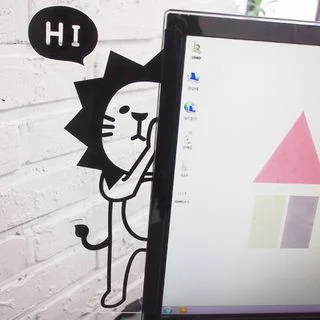
Computer Monitor Memo Board by Hera's Place

Computer Monitor Memo Board

Elevate your workspace and streamline your thoughts with the ultimate memo board companion.

The ‘Computer Monitor Memo Board’ by Hera’s Place is designed to enhance workplace efficiency by providing an organized space for notes and reminders. This product attaches to the side of a computer monitor, offering a convenient solution for keeping essential information within easy reach.

Constructed from durable acrylic material, the memo board is both lightweight and sturdy, ensuring long-term usability without adding extra bulk to the monitor setup. Its transparent design allows it to blend seamlessly with any office decor while maintaining the visibility of the notes.

The board includes a dry-erase surface, allowing users to quickly jot down and erase notes as needed. Additionally, it features a clip at the top for securing important documents or photographs, enhancing its functionality.

Installation is straightforward, involving simple adhesive strips that leave no residue when removed. This makes it suitable for both permanent and temporary setups in various work environments.

From TikTok

How to use

  1. Clean the side of your computer monitor where you plan to attach the memo board to ensure it is free from dust and grease.
  2. Peel off the adhesive backing from the clear plastic memo board.
  3. Carefully align the memo board with the edge of your monitor and press firmly to secure it in place.
  4. Allow a few minutes for the adhesive to set before attaching any notes or stickers.
  5. Organize your Post-Its and stickers on the memo board to keep your desktop clutter-free.

Questions + answers

How does the Computer Monitor Memo Board help organize my workspace?

The memo board adheres to your monitor, providing a designated space for notes and reminders, thus decluttering your desktop.

Can I customize the look of my memo board?

Yes, it is available in different designs, allowing you to choose one that best suits your style.

Will the adhesive damage my computer monitor?

The adhesive is designed to securely attach without causing any damage to your monitor surface.
Share ๐Ÿซถ

๋ฌผ์„ ์ž์ฃผ ๋งˆ์…”์ฃผ์„ธ์š”ใ€ฐ๏ธDrink water frequently ๊นŠ๊ฒŒ ์ˆจ์„ ์‰ฌ์–ด๋ณด์„ธ์š”ใ€ฐ๏ธTake a deep breath ํ•˜๋ฃจ 10๋ถ„ ์ŠคํŠธ๋ ˆ์นญํ•˜์„ธ์š”ใ€ฐ๏ธStretch for 10 minutes a day ์Šค์Šค๋กœ์—๊ฒŒ ์นœ์ ˆํ•˜์„ธ์š”ใ€ฐ๏ธBe kind to yourself ์ž˜ ๋จน๊ณ  ์ž˜ ์‰ฌ์„ธ์š”ใ€ฐ๏ธEat well and rest well ์˜ค๋Š˜ ํ•˜๋ฃจ๋„ ์ˆ˜๊ณ ํ–ˆ์–ด์š”ใ€ฐ๏ธYou did well today ํ–‡๋น›์„ ์ฌ๋ฉฐ ์‚ฐ์ฑ…ํ•˜์„ธ์š”ใ€ฐ๏ธTake a walk in the sunlight ์ž‘์€ ํ–‰๋ณต์„ ์ฐพ์•„๋ณด์„ธ์š”ใ€ฐ๏ธFind small joys ๊ธ์ •์ ์ธ ์ƒ๊ฐ์„ ํ•ด๋ณด์„ธ์š”ใ€ฐ๏ธTry to think positively ํŽธ์•ˆํ•œ ์Œ์•…์„ ๋“ค์–ด๋ณด์„ธ์š”ใ€ฐ๏ธListen to calming music ์ผ๊ธฐ๋ฅผ ์จ๋ณด์„ธ์š”ใ€ฐ๏ธTry writing a journal ์ข‹์€ ํ–ฅ๊ธฐ๋กœ ๊ธฐ๋ถ„ ์ „ํ™˜ํ•˜์„ธ์š”ใ€ฐ๏ธLift your mood with a nice fragrance ํ•˜๋ฃจ ํ•œ ๋ฒˆ ์›ƒ์–ด๋ณด์„ธ์š”ใ€ฐ๏ธSmile at least once a day ๋””์ง€ํ„ธ ๋””ํ†ก์Šค๋ฅผ ํ•ด๋ณด์„ธ์š”ใ€ฐ๏ธTry a digital detox ๋‹น์‹ ์˜ ํŽ˜์ด์Šค๋ฅผ ์ง€์ผœ๋ณด์„ธ์š”ใ€ฐ๏ธKeep your own pace ๋ฌผ์„ ์ž์ฃผ ๋งˆ์…”์ฃผ์„ธ์š”ใ€ฐ๏ธDrink water frequently ๊นŠ๊ฒŒ ์ˆจ์„ ์‰ฌ์–ด๋ณด์„ธ์š”ใ€ฐ๏ธTake a deep breath ํ•˜๋ฃจ 10๋ถ„ ์ŠคํŠธ๋ ˆ์นญํ•˜์„ธ์š”ใ€ฐ๏ธStretch for 10 minutes a day ์Šค์Šค๋กœ์—๊ฒŒ ์นœ์ ˆํ•˜์„ธ์š”ใ€ฐ๏ธBe kind to yourself ์ž˜ ๋จน๊ณ  ์ž˜ ์‰ฌ์„ธ์š”ใ€ฐ๏ธEat well and rest well ์˜ค๋Š˜ ํ•˜๋ฃจ๋„ ์ˆ˜๊ณ ํ–ˆ์–ด์š”ใ€ฐ๏ธYou did well today ํ–‡๋น›์„ ์ฌ๋ฉฐ ์‚ฐ์ฑ…ํ•˜์„ธ์š”ใ€ฐ๏ธTake a walk in the sunlight ์ž‘์€ ํ–‰๋ณต์„ ์ฐพ์•„๋ณด์„ธ์š”ใ€ฐ๏ธFind small joys ๊ธ์ •์ ์ธ ์ƒ๊ฐ์„ ํ•ด๋ณด์„ธ์š”ใ€ฐ๏ธTry to think positively ํŽธ์•ˆํ•œ ์Œ์•…์„ ๋“ค์–ด๋ณด์„ธ์š”ใ€ฐ๏ธListen to calming music ์ผ๊ธฐ๋ฅผ ์จ๋ณด์„ธ์š”ใ€ฐ๏ธTry writing a journal ์ข‹์€ ํ–ฅ๊ธฐ๋กœ ๊ธฐ๋ถ„ ์ „ํ™˜ํ•˜์„ธ์š”ใ€ฐ๏ธLift your mood with a nice fragrance ํ•˜๋ฃจ ํ•œ ๋ฒˆ ์›ƒ์–ด๋ณด์„ธ์š”ใ€ฐ๏ธSmile at least once a day ๋””์ง€ํ„ธ ๋””ํ†ก์Šค๋ฅผ ํ•ด๋ณด์„ธ์š”ใ€ฐ๏ธTry a digital detox ๋‹น์‹ ์˜ ํŽ˜์ด์Šค๋ฅผ ์ง€์ผœ๋ณด์„ธ์š”ใ€ฐ๏ธKeep your own pace